 cduck.me
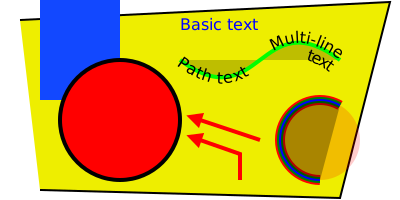

 1<?xml version="1.0" encoding="UTF-8"?>
 2<svg xmlns="http://www.w3.org/2000/svg" xmlns:xlink="http://www.w3.org/1999/xlink"
 3     width="400" height="200" viewBox="-100.0 -50.0 200 100">
 4<defs>
 5<path d="M-10,-20 C30,10,30,-50,70,-20" stroke-width="2" stroke="lime" fill="black" fill-opacity="0.2" id="d0" />
 6<marker markerWidth="4.0" markerHeight="4.0" viewBox="-0.1 -0.5 1.0 1.0" orient="auto" id="d1">
 7<path d="M-0.1,0.5 L-0.1,-0.5 L0.9,0 Z" fill="red" />
 8</marker>
 9</defs>
10<path d="M-80,45 L70,49 L95,-49 L-90,-40" fill="#eeee00" stroke="black" />
11<rect x="-80" y="-50" width="40" height="50" fill="#1248ff">
12<title>Our first rectangle</title>
13</rect>
14<circle cx="-40" cy="10" r="30" fill="red" stroke-width="2" stroke="black" />
15<use xlink:href="#d0" />
16<text x="-10" y="-35" font-size="8" fill="blue" dy="0em">Basic text</text>
17<text font-size="8" text-anchor="start"><textPath xlink:href="#d0" startOffset="0">
18<tspan dy="0.4em">Path text</tspan>
19</textPath></text>
20<g>
21<text font-size="8" text-anchor="end"><textPath xlink:href="#d0" startOffset="100%">
22<tspan dy="0em" dx="-1">Multi-line</tspan>
23</textPath></text>
24<text font-size="8" text-anchor="end"><textPath xlink:href="#d0" startOffset="100%">
25<tspan dy="1em" dx="-1">text</tspan>
26</textPath></text>
27</g>
28<circle cx="60" cy="20" r="20" stroke-dasharray="73.30382858376184 52.35987755982988" stroke-dashoffset="-31.41592653589793" stroke="red" stroke-width="5" fill="red" fill-opacity="0.2" />
29<path d="M70.0,2.679491924311229 A20,20,0,1,0,59.99999999999999,40.0" stroke="green" stroke-width="3" fill="none" />
30<path d="M59.99999999999999,40.0 A20,20,0,1,1,70.0,2.679491924311229" stroke="blue" stroke-width="1" fill="black" fill-opacity="0.3" />
31<path d="M20,40 L20,27 L0,20" stroke="red" stroke-width="2" fill="none" marker-end="url(#d1)" />
32<path d="M30,20 L0,10" stroke="red" stroke-width="2" fill="none" marker-end="url(#d1)" />
33</svg>